Figure 5‑14: Red ALLIANCE WALL (highlighted in red)
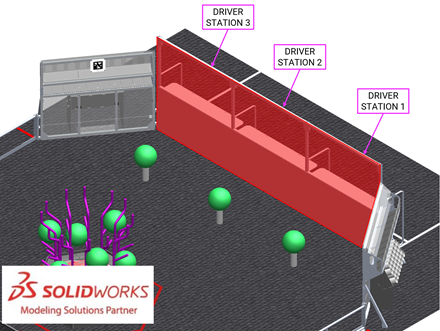
The ALLIANCE WALL separates ROBOTS
from DRIVE TEAM members in the ALLIANCE AREA. It consists of 3 DRIVER
STATIONS.
Figure 5‑15 DRIVER STATION (ALLIANCE AREA perspective and FIELD
perspective)
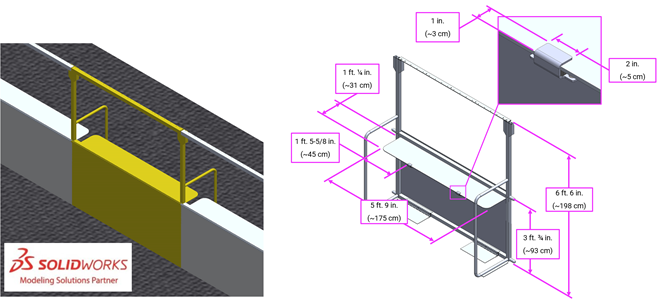
A DRIVER STATION is 1 of 3
assemblies within an ALLIANCE WALL behind which a DRIVE TEAM operates their ROBOT.
Each DRIVER STATION is made from a 3 ft. ¾ in. (~93 cm) tall diamond plate base
topped with a 3 ft. 6 in. (~107 cm) tall transparent plastic sheet and a top
rail. An aluminum shelf is attached to each DRIVER STATION to support an
OPERATOR CONSOLE. The shelf is 5 ft. 9 in. (~175 cm) wide and 1 ft. ¼ in. (~31
cm) deep. There is a 4 ft. 6 in. (~137 cm) long by 2 in. (nominal) wide strip
of hook-and-loop tape (“loop” side) along the center of the support shelf that
may be used to secure the OPERATOR CONSOLE to the shelf. The shelf also
includes two clips to hold the shelf in place with a 1 in. (~25 mm) by 2 in. (~51
mm) thick tab that sits on the top surface of the shelf.
There may be a ramp available at events for DRIVE TEAMS
with limited mobility. It is designed to allow an individual using a wheelchair
to access the DRIVER STATION shelf and/or see onto the FIELD; however, this
accommodation is available to anyone who has a wheelchair or other physical
disability that obstructs their view of the FIELD. Due to space constraints,
the ramp is not allowed to be used in the PROCESSOR AREA. Teams should speak to
the FTA before MATCHES begin to ensure that it is available for each of the
team’s MATCHES.
This ramp is available at many Regional and District
events. For questions, please connect with the local Program Delivery Partner.
Each DRIVER STATION contains the following elements for
DRIVE TEAMS:
-
1 Ethernet cable: attaches to the Ethernet port of the OPERATOR
CONSOLE and provides connectivity to the FIELD Management System
(FMS)
-
1 120VAC NEMA 5-15R power outlet (i.e. standard US outlet):
located on each DRIVER STATION shelf and protected by its own 2-Amp circuit
breaker. It can be used to power the OPERATOR CONSOLE. DRIVE TEAMS are
responsible for monitoring their power consumption as a tripped breaker in the
outlet does not constitute an ARENA FAULT. For some events in regions that
don’t use NEMA 5-15 shaped outlets, event organizers may install appropriate
plug adapters to be used throughout the event.
-
1 Emergency Stop (E-Stop) button: located on the left side of the
DRIVER STATION shelf and is used to deactivate a ROBOT in an emergency
-
1 Autonomous Stop (A-Stop) button: located on the right side of
the DRIVER STATION shelf and is used to DISABLE a ROBOT during AUTO
-
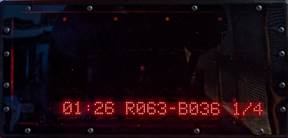
1 team sign: located at the top of each DRIVER STATION. The FIELD
facing side of the sign displays the team number in the ALLIANCE color. The
ALLIANCE AREA side of the sign displays the following information in red:
o
Pre-MATCH: team number and ROBOT connection state
o
During the MATCH:
§
remaining MATCH period time,
§
MATCH scores, and
§
progress towards the CORAL RP threshold (n/a during the Playoff
Tournament).
Figure 5‑16 Back of team sign
-
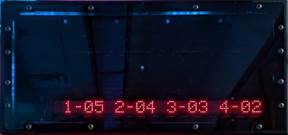
1 timer (in DRIVER STATION 2 only): displays the official time
remaining in the MATCH period on the FIELD-facing side (in white) and a more
detailed breakdown of CORAL scored on each level of the REEF on the TEAM-facing
side. (in red).
Figure 5‑17 Back of timer
-
1 team LED stack: indicates ALLIANCE color, ROBOT status, E-Stop and
A-Stop status, and is centered at the top of each DRIVER STATION.
The stack includes 2 identical ALLIANCE-colored
ROBOT status LEDs above a third amber A-stop/E-stop LED. LED states are as
follows:
o
ROBOT status LEDs
§
Solid: indicates that the ROBOT is connected and enabled. This
only happens during a MATCH.
§
Blinking: indicates that either the FMS is preset for the MATCH
and the ROBOT is not connected yet, or it’s during a MATCH and the
corresponding ROBOT is BYPASSED, has lost connectivity, or the E-stop was
pressed.
§
Off: indicates that the ROBOT is linked and DISABLED prior to the
start of the MATCH. This light is also off, regardless of ROBOT connection
status, after the MATCH has concluded.
o
A-Stop/E-stop LED
§
Solid: the ROBOT is DISABLED due to a press of the team E-stop
button, the FIELD E-stop button, or by the scorekeeper via the FMS.
§
Blinking: the ROBOT is DISABLED for the remainder of AUTO due to
a press of the team A-Stop button.
§
Off: the ROBOT is not DISABLED by the FIELD.
-
FMS hardware and wiring: mostly located below shelves in the 2
DRIVER STATIONS closer to the scoring table.
Figure 5‑18 CORAL STATION
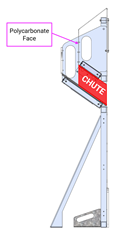
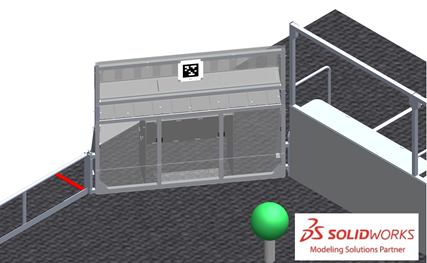
A CORAL STATION is an assembly
through which HUMAN PLAYERS feed CORAL into the FIELD. There are 4 CORAL STATIONS,
1 in each corner of the FIELD connecting the guardrail to the ALLIANCE WALL. Each
CORAL STATION has a 6 ft. 4 in. wide by 7 in. tall (~193 cm wide by ~18 cm tall)
opening through which CORAL passes to the FIELD; the bottom of the opening is 3
ft. 1½ in. (~95 cm) from the carpet. A 55° sloped tunnel,
called the CHUTE, leads to the opening in the CORAL
STATION.
There are 2 stools available at events for DRIVE TEAMS to
use. Each stool is 1 ft. 11 in. (~58 cm) wide by 1 ft. 1½ in. (~34 cm) deep, 6¼
in. (~16 cm) tall, and rated for 300 lbs. (~136 kg).
It is specially intended to allow individuals who are
shorter, better sightlines onto the FIELD; however, this accommodation is
available to anyone who has another physical disability that obstructs their
view of the FIELD. Due to space constraints, stools are not allowed to be used
in the PROCESSOR AREA.
Only 2 stools are available, and priority will be given to
those with the biggest need. Teams should speak to the FTA before MATCHES begin
to request that it is available for each of the team’s MATCHES. Teams may also purchase
their own (Item Number: 779ac01stpm) or bring an
equivalent (e.g. not foldable and similar dimensions) version to the event to
guarantee use for every match.
This stool is available at all events within the US &
Canada and equivalents are available at international events. For questions,
please connect with the local Program Delivery Partner.